Appearance
Topic Management Guide
Introduction
The Topic Management system allows administrators to create and manage primary categories for organizing content throughout the platform. Topics provide a structured categorization system that helps organize content and generate meaningful analytics about user interactions. This guide explains how to effectively use the Topic Management interface to create and maintain topics.
Accessing Topic Management
The Topic Management component is accessible to users with specific roles:
- Admin
- Content
- Manager
This interface is typically found in the system settings under AI Settings or Content Management sections.
Understanding Topics
Topics are primary categories that provide high-level organization for content:
Purpose:
- Create main content categories
- Establish consistent organizational structure
- Enable analytics and reporting by category
- Facilitate content management and discovery
Characteristics:
- Single primary topic per content item
- System-defined (managed centrally)
- Used in reporting and analytics
- More formal than tags
Benefits:
- Consistent content organization
- Structured navigation
- Insights into user interests
- Clear content ownership
Topic Management Interface
The Topic Management interface consists of these key components:
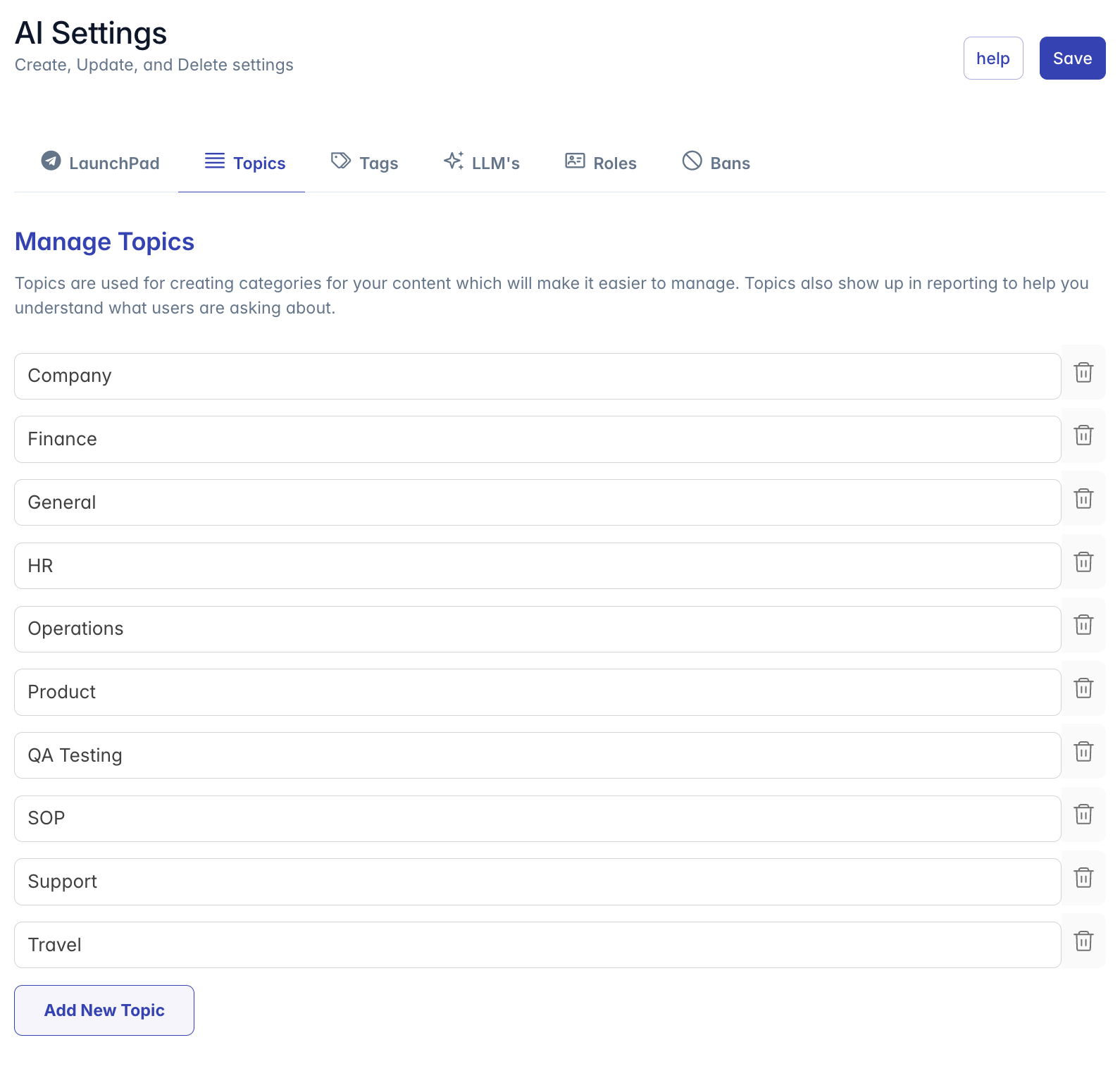
- Header: Title "Manage Topics" with explanatory text
- Topic List: List of existing system topics
- Add Topic Button: Button to create new topics
- Topic Input Fields: Text fields for entering topic names
Managing Topics
Adding Topics
To create a new topic:
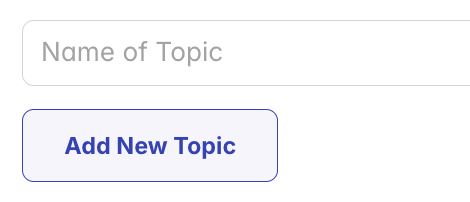
- Click the "Add New Topic" button at the bottom of the topic list
- A new input field will appear
- Enter the desired topic name in the field
- Use clear, descriptive terminology
- Consider organizational structure
- Choose names that make sense to end users
- The topic will be validated as you type
- When you save the settings page, all valid topics will be saved
Topics added through this interface become available across the system for:
- Content categorization
- Blueprint organization
- Knowledge base classification
- Analytics and reporting
Editing Topics
To modify an existing topic:
- Locate the topic in the list
- Click in its text field
- Edit the topic name as desired
- Changes are applied when the settings page is saved
Note: Editing a topic changes it across all content where it's applied. This is a global change that affects all items using that topic and any reports or analytics based on that topic.
Removing Topics
To delete a topic:
- Locate the topic in the list
- Click the trash icon (×) button on the right side of the topic
- The topic is removed from the list
- When settings are saved, the topic will be removed from the system
Important: Before removing a topic, ensure it is not in use. Content items using a deleted topic may be reassigned to a default topic or left without a topic, depending on system configuration.
Topic Usage
Once created, topics are used throughout the system in various contexts:
Content Categorization
When creating or editing content:
- Select a single topic from the available system topics
- The topic defines the primary category for the content
- Content can be filtered or grouped by topic
Blueprint Organization
When configuring AI Blueprints:
- Assign a primary topic to categorize the Blueprint
- Use topics to organize Blueprints in listings
- Filter Blueprint lists by selected topic
Knowledge Base Classification
When managing Knowledge Bases:
- Assign a primary topic to each Knowledge Base
- Use topics to organize Knowledge Bases by department or function
- Filter and group Knowledge Bases by topic
Analytics and Reporting
Topics provide important data structure for analytics:
- User questions can be analyzed by topic
- Usage patterns can be identified by topic
- Content gaps can be detected within specific topics
- Performance metrics can be compared across topics
Topics vs. Tags
Understanding the difference between topics and tags:
| Feature | Topics | Tags |
|---|---|---|
| Number per item | One primary topic | Multiple tags |
| Creation | Centrally managed | Central or ad-hoc |
| Purpose | Primary categorization | Secondary classification |
| Structure | Formal, consistent | Flexible, evolving |
| Analytics | Used in reporting | Less formal tracking |
| Selection | Select from pre-defined list | Select or create new |
Topics provide structured organization while tags offer flexible, multi-dimensional classification.
Best Practices
For effective topic management:
Strategic Planning:
- Create a comprehensive topic list before implementation
- Align topics with organizational structure when appropriate
- Consider content volume when defining topics
- Avoid creating too many or too few topics
Naming Conventions:
- Use clear, descriptive names
- Maintain consistent capitalization (typically Title Case)
- Consider using nouns or noun phrases
- Make topics intuitive for both creators and users
Topic Structure:
- Keep the total number of topics manageable (typically 10-20)
- Ensure topics are distinct from each other
- Cover all major content areas in your organization
- Consider departmental or functional divisions
Governance:
- Establish clear guidelines for topic usage
- Define who can create or modify topics
- Document the purpose and scope of each topic
- Review topic usage periodically to ensure consistency
Troubleshooting
Issue: Topics not appearing in content creation interfaces
- Refresh the interface to load the latest topics
- Verify that topics were properly saved in the Topic Management interface
- Check user permissions for topic visibility
Issue: Unable to add new topics
- Ensure you have the required permissions (Admin, Content, or Manager)
- Check that the topic name is valid and not duplicated
- Verify the topic field is not empty when trying to save
Issue: Analytics showing incorrect topic data
- Confirm topics are properly applied to content items
- Check if topics have been renamed recently
- Allow time for analytics to process topic changes
Issue: Too many or overlapping topics
- Develop a plan to consolidate similar topics
- Focus on major categories rather than specific subjects
- Consider using tags for more granular classification
- Review your topic strategy with stakeholders
Issue: Content appears under unexpected topics
- Verify topic assignment for the content item
- Check if topics have been renamed or deleted
- Review any bulk operations that might have modified topics
For additional assistance with topic management, please contact your system administrator or refer to the platform documentation.