Appearance
AI Knowledge Base Dashboard Guide
Introduction
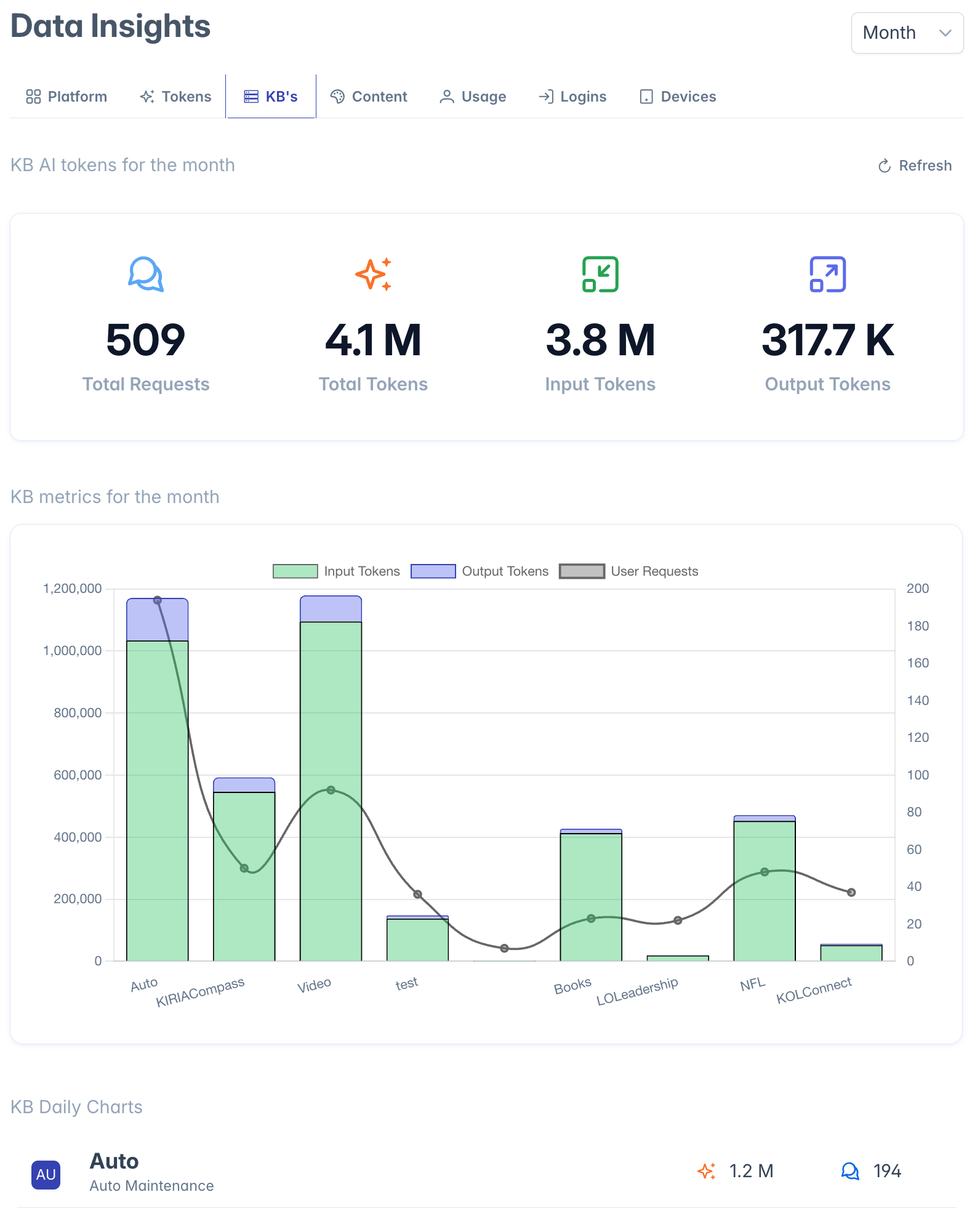
The AI Knowledge Base Dashboard provides administrators and content managers with analytical insights into your organization's AI knowledge bases. This specialized dashboard helps you monitor knowledge base growth, usage patterns, and content metrics to better understand how your knowledge management strategy is performing.
Accessing the AI Knowledge Base Dashboard
The AI Knowledge Base Dashboard is accessible to users with the following roles:
- Admin
- Content
- Manager
To access the dashboard, navigate to the Insights section from the main navigation menu and select "AI Knowledge Base Dashboard."
Dashboard Interface Overview
The AI Knowledge Base Dashboard focuses exclusively on knowledge base analytics, providing a centralized view of key metrics through the Knowledge Base Counts chart. This streamlined interface ensures that knowledge base administrators can quickly access the information most relevant to their responsibilities.
Knowledge Base Metrics Analysis
The main component of the dashboard is the Knowledge Base Counts chart, which provides several key metrics:
Knowledge Base Growth Metrics
The chart displays information about:
- Total Knowledge Bases: Number of distinct knowledge bases in the system
- Knowledge Base Documents: Total number of documents across all knowledge bases
- Content Types: Distribution of different document formats within knowledge bases
- Growth Trends: Changes in knowledge base counts over time
Knowledge Base Usage Metrics
Depending on your implementation, the dashboard may also show:
- Query Frequency: How often knowledge bases are referenced in AI conversations
- Query Success Rate: Percentage of queries that successfully retrieve relevant information
- Top Performing Knowledge Bases: Which knowledge bases provide the most valuable information
- Content Coverage Analysis: Identification of knowledge gaps based on query patterns
Using the Dashboard for Knowledge Management
Content Strategy Planning
The dashboard helps you make informed decisions about:
- Which knowledge bases need additional content
- What types of documents are most prevalent or lacking
- How evenly content is distributed across knowledge domains
- Where to focus knowledge expansion efforts
Performance Monitoring
By tracking knowledge base metrics over time, you can:
- Measure the impact of content improvement initiatives
- Track growth in specific knowledge domains
- Monitor indexing and processing status of knowledge bases
- Identify underutilized knowledge resources
Quality Assessment
The dashboard helps identify potential quality issues:
- Knowledge bases with unusually low query success rates
- Content areas with limited document coverage
- Outdated knowledge bases that need refreshing
- Knowledge bases that may need reprocessing
Interpreting Dashboard Data
Healthy Knowledge Base Patterns
Signs of a well-maintained knowledge management system include:
- Steady growth in knowledge base content
- Even distribution across important topic areas
- High query success rates
- Regular additions of new documents
Potential Warning Signs
Patterns that may indicate knowledge management issues:
- Stagnant knowledge base growth
- Heavily imbalanced content distribution
- Low query success rates for specific knowledge bases
- Knowledge bases with no recent updates
Knowledge Base Optimization Opportunities
The dashboard helps identify several types of optimization opportunities:
Content Gap Identification
- Knowledge domains with limited document coverage
- Frequently queried topics with insufficient content
- Subject areas with outdated information
Processing Improvements
- Knowledge bases that may benefit from reindexing
- Content that would perform better with different chunking strategies
- Documents that need metadata enrichment
Organizational Refinements
- Knowledge bases that could be consolidated
- Content that should be reorganized into new knowledge structures
- Duplicate or redundant knowledge bases
Troubleshooting
Issue: Dashboard shows no data
- Verify knowledge bases have been created in your system
- Check if knowledge base processing has completed successfully
- Ensure your role has permission to view knowledge base analytics
Issue: Metrics seem outdated or incomplete
- Knowledge base processing may still be in progress
- Try refreshing the dashboard
- Check if any system maintenance tasks are currently running
Issue: Cannot access certain dashboard features
- Some detailed analytics may require specific administrative permissions
- Verify your role includes knowledge base management privileges
- Check with your system administrator about access requirements
For additional assistance with the AI Knowledge Base Dashboard, please contact your system administrator.