Appearance
User Profile Personal Information Guide
Introduction
The User Profile Personal Information component allows administrators to record and manage additional details about users beyond basic account information. This supplementary data includes professional details and address information that may be useful for organizational purposes.
Accessing Personal Information
The Personal Information component is accessible to users with specific roles:
- Admin
- Content
- Manager
To access this component:
- Navigate to a user profile page (
/user/profile/[user_id]) - Click on the "Personal Information" tab in the left navigation menu
Personal Information Interface Overview
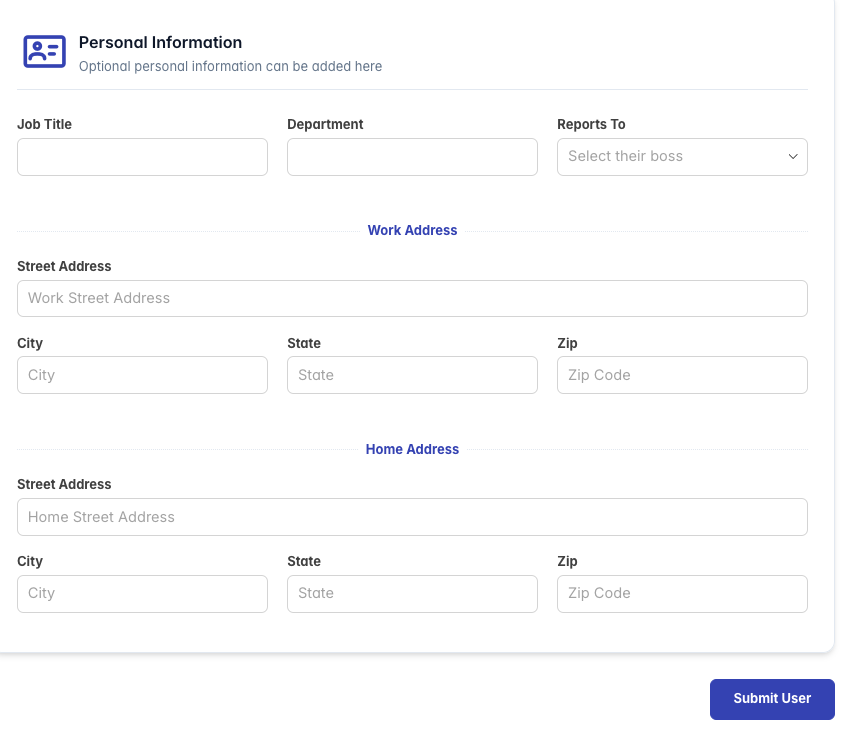
The Personal Information interface displays a form with multiple sections organized in a responsive grid layout. Each section contains related fields with clear labels and appropriate input controls.
The header area includes:
- An ID card icon indicating personal details
- A "Personal Information" title
- A brief description: "Optional personal information can be added here"
The form is divided into three main sections:
- Professional Details
- Work Address
- Home Address
Available Information Fields
Professional Details
These fields capture information related to the user's role within the organization:
Job Title
- Type: Text field
- Purpose: Records the user's official position or title
- Example: "Senior Developer", "Marketing Manager", "Regional Director"
- This field helps identify the user's role within the organizational hierarchy
Department
- Type: Text field
- Purpose: Records which department or business unit the user belongs to
- Example: "Engineering", "Marketing", "Human Resources", "Finance"
- This field enables filtering and grouping users by department
Reports To
- Type: Dropdown selection
- Purpose: Identifies the user's direct supervisor or manager
- Options: List of potential managers in the system
- This field helps establish organizational reporting structures
Work Address
This section captures the user's work location:
Street Address
- Type: Text field
- Purpose: Records the street number, name, and any unit/suite information
- Example: "123 Business Park Drive, Suite 200"
City
- Type: Text field
- Purpose: Records the city name
- Example: "San Francisco"
State
- Type: Text field
- Purpose: Records the state or province
- Example: "CA", "New York", "Ontario"
Zip/Postal Code
- Type: Text field
- Purpose: Records the postal code
- Example: "94105", "M5V 2H1"
Home Address
This section captures the user's personal residence information:
Street Address
- Type: Text field
- Purpose: Records the user's home street address
- Example: "456 Residential Lane, Apt 7B"
City
- Type: Text field
- Purpose: Records the city name
- Example: "Chicago"
State
- Type: Text field
- Purpose: Records the state or province
- Example: "IL", "Texas", "British Columbia"
Zip/Postal Code
- Type: Text field
- Purpose: Records the postal code
- Example: "60601", "V6B 2G9"
Managing Personal Information
Adding Information
- Navigate to the user's Personal Information tab
- Fill in the desired fields
- Personal information is saved when the main user profile form is submitted
Updating Information
- Navigate to the user's Personal Information tab
- Modify the fields as needed
- Changes are saved when the main user profile form is submitted
Clearing Information
- Navigate to the user's Personal Information tab
- Delete the content from fields you wish to clear
- Changes are saved when the main user profile form is submitted
Data Usage and Privacy
Personal information collected in this section should be handled according to your organization's data privacy policies:
- Purpose Limitation: Only collect information necessary for legitimate business purposes
- Access Control: Limit who can view personal address information
- Data Minimization: Consider whether all fields are necessary for your organization
- Legal Compliance: Ensure collection complies with applicable privacy laws (GDPR, CCPA, etc.)
- Retention: Define and follow policies for how long this information is kept
Best Practices
Complete Professional Details
- Always complete Job Title and Department fields for organizational clarity
- Use consistent naming for departments across all users
- Maintain an accurate reporting structure through the "Reports To" field
Address Information
- Work address should be recorded for all employees for emergency contact purposes
- Home address information should be collected only when necessary for:
- Payroll/tax purposes
- Shipping company equipment
- Emergency contact situations
Data Standardization
- Use consistent formats for addresses
- Consider using address validation for postal codes
- Standardize state/province abbreviations (e.g., "CA" vs "California")
Organizational Hierarchy
- Keep the "Reports To" field updated when management changes occur
- This information may be used for automated approval workflows
- Accurate reporting structures enable better organizational analytics
Maintenance
- Review personal information periodically for accuracy
- Update information when users change roles or locations
- Remove outdated information to maintain data quality
Note that all fields in the Personal Information section are optional. However, completing them provides valuable context for user management and organizational structure visualization.