Appearance
Device Dashboard Guide
Introduction
The Device Dashboard provides administrators and managers with comprehensive analytics on the devices and browsers your users are using to access the system. This specialized visual interface helps you understand your users' technology preferences, optimize the user experience for popular devices, and make informed decisions about platform support and compatibility.
Accessing the Device Dashboard
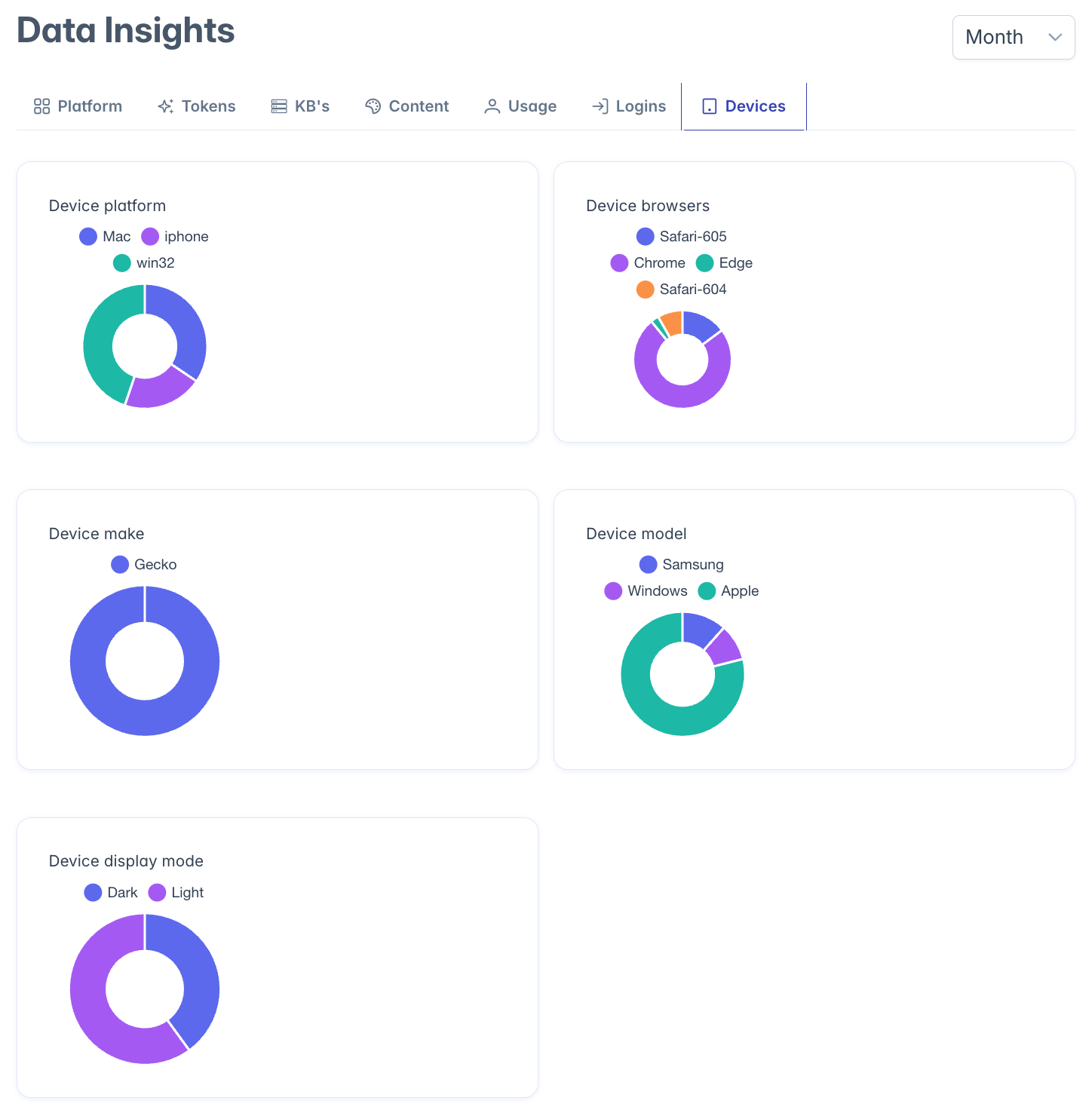
The Device Dashboard is accessible to users with the following roles:
- Admin
- Content
- Manager
To access the dashboard, navigate to the Insights section from the main navigation menu and select "Device Dashboard."
Dashboard Interface Overview
The Device Dashboard presents five analytical doughnut charts, arranged in a grid layout, each focused on a different aspect of device usage. This visual arrangement allows administrators to quickly assess multiple dimensions of device analytics at a glance.
Dashboard Charts
Device Platform Distribution
- Location: Top-left panel
- Chart Type: Doughnut chart
- Purpose: Shows the breakdown of operating systems used to access your platform
- Typical Data: Windows, macOS, iOS, Android, Linux
- Value: Helps identify which operating systems to prioritize for testing and optimization
Browser Distribution
- Location: Top-center panel
- Chart Type: Doughnut chart
- Purpose: Displays the percentage of users on different web browsers
- Typical Data: Chrome, Safari, Firefox, Edge, Opera
- Value: Critical for ensuring cross-browser compatibility and prioritizing browser-specific optimizations
Device Manufacturer
- Location: Top-right panel
- Chart Type: Doughnut chart
- Purpose: Shows the breakdown of device manufacturers
- Typical Data: Apple, Samsung, Dell, HP, Lenovo
- Value: Helps understand which hardware ecosystems are most prevalent among your users
Device Model Distribution
- Location: Bottom-left panel
- Chart Type: Doughnut chart
- Purpose: Provides insights into specific device models being used
- Typical Data: iPhone 12, Galaxy S21, MacBook Pro, Surface Pro
- Value: Offers more granular understanding of device capabilities and limitations
Display Mode Analytics
- Location: Bottom-center panel
- Chart Type: Doughnut chart
- Purpose: Shows distribution of light/dark theme usage and display preferences
- Typical Data: Light Mode, Dark Mode, Auto (System Preference)
- Value: Helps optimize UI design choices and understand visual preferences
Using the Dashboard for Experience Optimization
Platform Compatibility Planning
The Device Dashboard helps you make informed decisions about:
- Which operating systems require the most thorough testing
- When to phase out support for legacy platforms
- How to prioritize platform-specific feature development
- Which platforms require specialized optimization
Browser Compatibility Testing
Browser distribution data helps you:
- Identify which browsers to focus on during QA testing
- Understand which browser-specific issues could affect the most users
- Determine if you need polyfills for older browsers
- Prioritize browser-specific optimizations
Mobile Experience Optimization
Device model and manufacturer data helps you:
- Understand the prevalence of mobile vs. desktop usage
- Identify which mobile devices need special attention
- Optimize for the screen sizes and resolutions most commonly used
- Determine if special accommodations are needed for specific devices
Visual Design Decisions
Display mode analytics inform your design strategy:
- Whether to prioritize dark mode optimizations
- How many users might be affected by theme-specific issues
- If automatic theme switching needs additional testing
- Which theme to use in documentation screenshots and training materials
Interpreting Dashboard Data
Device Diversity Assessment
The dashboard helps you understand how diverse your users' device ecosystem is:
- High concentration on few platforms suggests a more homogeneous user base
- Wide distribution across many devices indicates higher device diversity
- Enterprise environments often show more standardization
- Consumer-facing applications typically show greater device variety
Identifying Technology Trends
Watch for evolving patterns in your device data:
- Growing segments may indicate shifting user preferences
- Declining segments might suggest platforms to consider phasing out
- New devices appearing in the data may require specific testing
- Seasonal changes might occur as users upgrade devices
Making Data-Driven Decisions
The Device Dashboard enables several types of strategic decisions:
Feature Development Prioritization
- Focus development efforts on features that benefit the most common platforms
- Sequence browser-specific optimizations based on usage percentages
- Determine which platforms justify specialized native applications
- Identify which legacy systems still need support
Testing Strategy Optimization
- Allocate QA resources based on platform popularity
- Create device testing matrices weighted toward common configurations
- Identify the minimal viable testing environment to cover most users
- Focus compatibility testing on the most critical platform combinations
User Experience Improvements
- Optimize layouts for the most common screen sizes
- Adjust touch targets based on prevalent mobile devices
- Fine-tune dark/light mode experiences based on usage patterns
- Address platform-specific usability challenges
Troubleshooting
Issue: Charts show limited or no data
- Verify that device analytics tracking is enabled
- Check if browser fingerprinting or device detection is properly configured
- Ensure sufficient user sessions have occurred to generate meaningful data
Issue: Unexpected device distribution
- Confirm that your analytics properly differentiate between similar devices
- Check if corporate VPNs or proxies might be affecting device identification
- Verify that mobile app usage is being tracked separately from mobile browsers if applicable
Issue: Cannot access certain dashboard features
- Some detailed device analytics may require specific administrative permissions
- Check with your system administrator about privacy settings that might limit device tracking
- Verify your role includes analytics access privileges
For additional assistance with the Device Dashboard, please contact your system administrator.