Appearance
Usage Dashboard Guide
Introduction
The Usage Dashboard provides administrators and managers with comprehensive analytics on platform usage patterns, user activity metrics, and system utilization trends. This powerful visualization tool helps you understand how users interact with your system, monitor engagement levels, and track adoption rates across your organization.
Accessing the Usage Dashboard
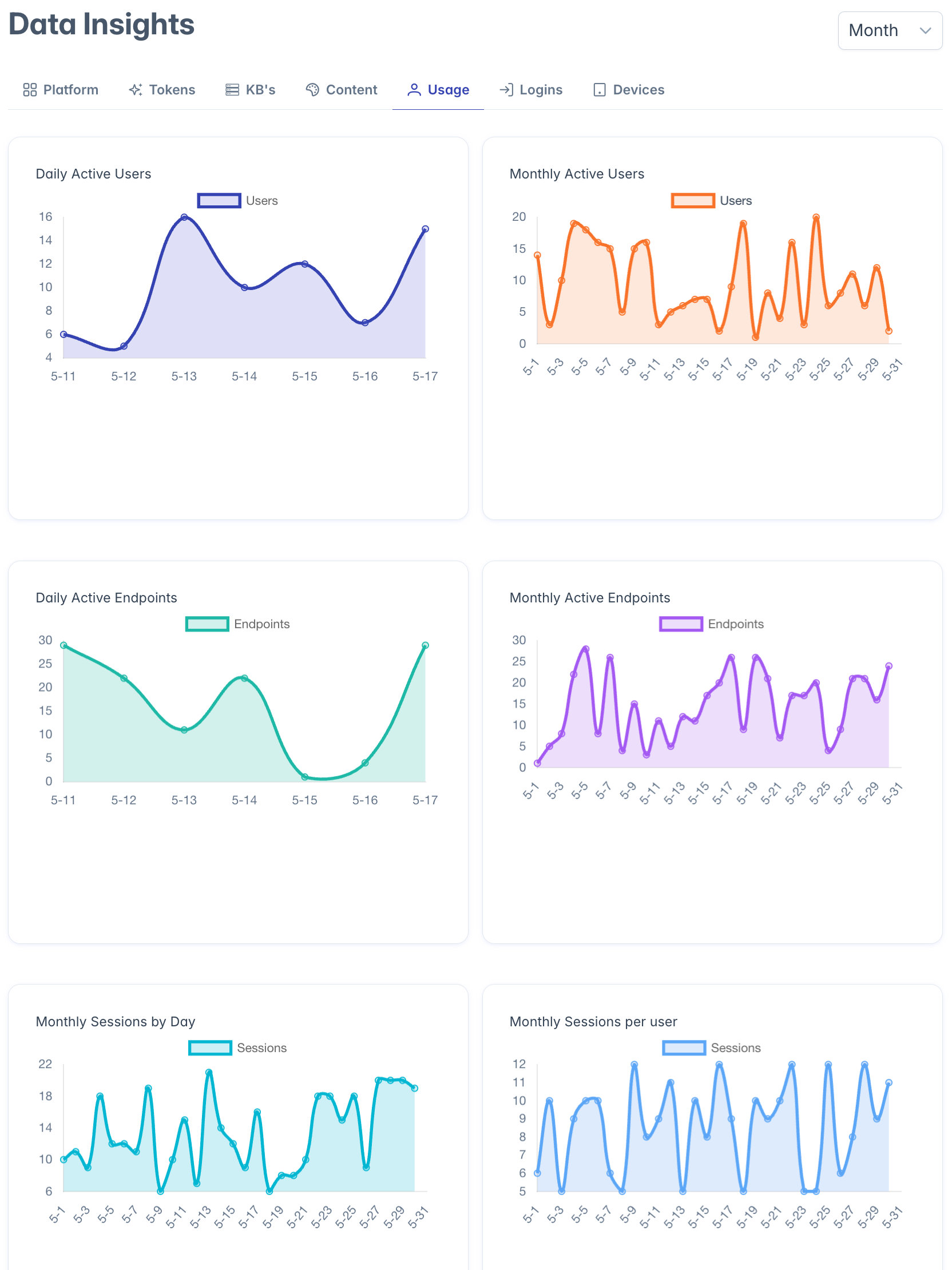
The Usage Dashboard is accessible to users with the following roles:
- Admin
- Content
- Manager
To access the dashboard, navigate to the Insights section from the main navigation menu and select "Usage Dashboard."
Dashboard Interface Overview
The Usage Dashboard presents a grid of six analytical charts, arranged in a logical sequence to help you understand different aspects of system usage. The dashboard is designed to provide both daily and monthly perspectives on key metrics.
Dashboard Charts
Daily Active Users (DAU)
- Location: Top-left panel
- Purpose: Tracks the number of unique users who access the system each day
- Time Frame: Shows a daily trend over recent weeks
- Value: Helps identify daily usage patterns and day-of-week trends
- Analysis: Look for consistent patterns, weekday vs. weekend differences, and response to new features or communications
Monthly Active Users (MAU)
- Location: Top-right panel
- Purpose: Displays the count of unique users who accessed the system in each month
- Time Frame: Shows month-by-month trend over the past year
- Value: Provides broader view of user adoption and retention
- Analysis: Monitor for sustained growth, seasonal patterns, and long-term trends
Daily Active Endpoints
- Location: Middle-left panel
- Purpose: Shows which system features and API endpoints are being used each day
- Time Frame: Recent daily activity
- Value: Identifies which functionality is most actively used
- Analysis: Discover which features drive engagement and which may be underutilized
Monthly Active Endpoints
- Location: Middle-right panel
- Purpose: Aggregates endpoint usage data by month
- Time Frame: Monthly patterns over the past year
- Value: Tracks feature adoption trends over longer periods
- Analysis: Monitor how feature usage evolves over time and correlates with system updates
Monthly Sessions
- Location: Bottom-left panel
- Purpose: Counts total system sessions (login events) per month
- Time Frame: Monthly counts over the past year
- Value: Measures overall system engagement frequency
- Analysis: Higher session counts indicate more frequent system access
Monthly Sessions Per User
- Location: Bottom-right panel
- Purpose: Shows the average number of sessions per active user each month
- Time Frame: Monthly averages over the past year
- Value: Measures intensity of usage per user
- Analysis: Higher numbers indicate users are accessing the system more frequently
Using the Dashboard for Organizational Insights
Adoption Analysis
The Usage Dashboard helps you track adoption through:
- Comparing DAU to total user count to calculate activation percentage
- Monitoring MAU growth to assess long-term adoption trends
- Analyzing which departments or teams show strongest adoption
- Identifying times when adoption accelerates or stalls
Engagement Measurement
Monitor how deeply users engage with the system:
- Sessions per user indicates frequency of system access
- Active endpoints show diversity of feature usage
- Daily patterns reveal when users are most active
- Monthly trends show if engagement is growing or declining
Feature Utilization
Understand which system capabilities are most valuable:
- Active endpoints charts highlight most-used features
- Compare feature usage across different user segments
- Identify underutilized features that may need promotion
- Track adoption of newly released capabilities
Interpreting Dashboard Data
Healthy Usage Patterns
Indicators of healthy system usage include:
- Steady or growing MAU counts
- Consistent DAU with appropriate business-cycle variations
- Multiple sessions per user per month
- Usage across a diverse range of endpoints
Potential Concerns
Patterns that may warrant investigation:
- Declining MAU or DAU trends
- Decreasing sessions per user
- Usage concentrated on very few endpoints
- Sharp drops in activity not aligned with business cycles
Analyzing User Behavior
The dashboard helps identify several important behavior patterns:
Usage Frequency
- Daily users (power users who access the system daily)
- Weekly users (regular users who access several times per week)
- Monthly users (occasional users who access a few times per month)
- Inactive users (accounts with no recent activity)
Usage Intensity
- Session frequency (how often users log in)
- Session duration (how long users stay engaged)
- Feature diversity (how many different endpoints users access)
- Activity trends (whether usage is increasing or decreasing)
Troubleshooting
Issue: Charts show incomplete or missing data
- Check the date range selection
- Verify that analytics tracking is properly configured
- Ensure your role has permission to view usage metrics
Issue: Unexpected drops in usage metrics
- Check for system outages during the period
- Verify if maintenance windows occurred
- Check if any communications or policy changes affected usage
Issue: Cannot access certain dashboard features
- Some detailed analytics may require specific administrative permissions
- Verify your role includes usage analytics privileges
- Check with your system administrator about access requirements
For additional assistance with the Usage Dashboard, please contact your system administrator.